An Alternative to Project Online — Open Your Exported Plans in the Browser
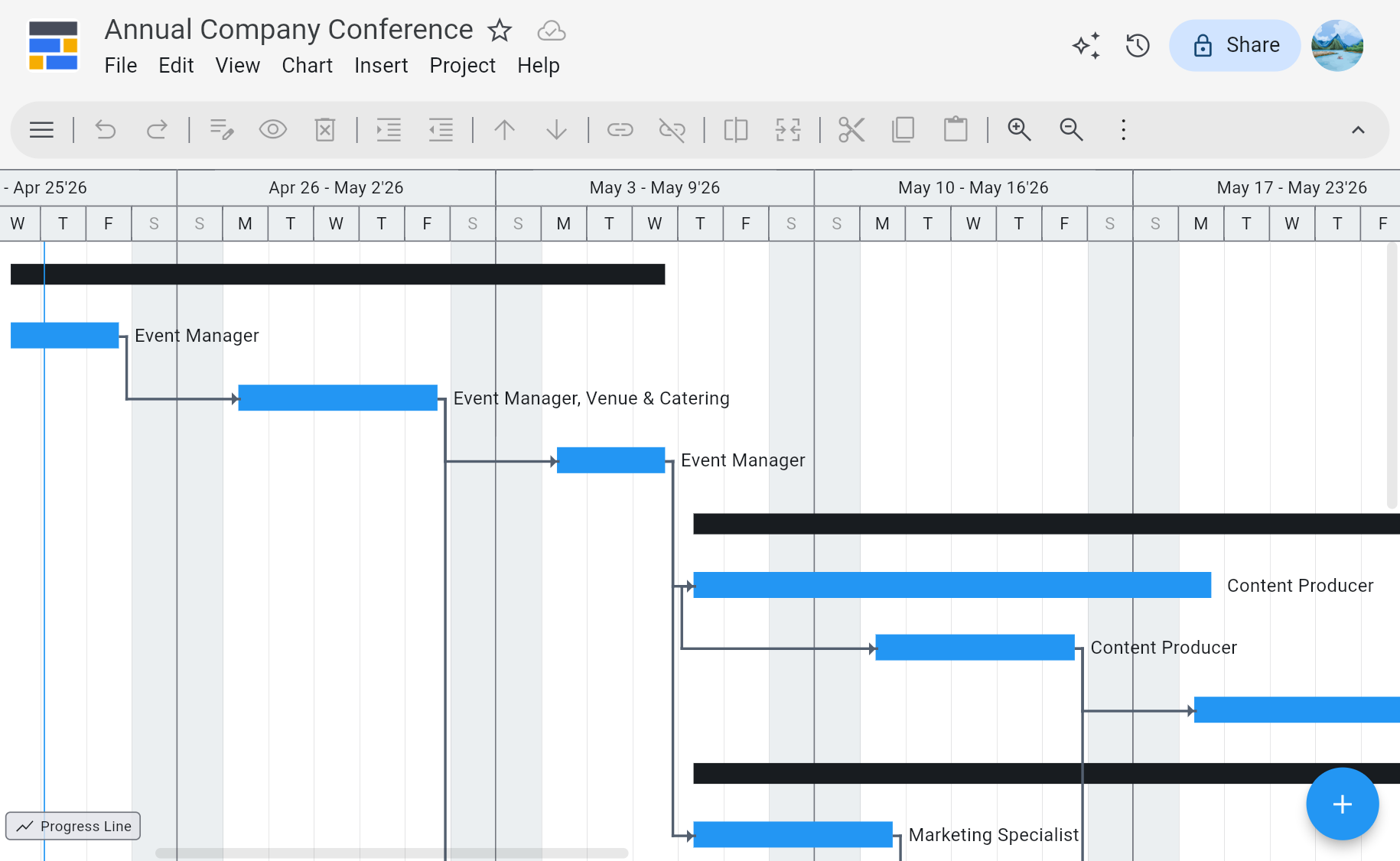
Microsoft's retirement date for Project Online is September 30, 2026. Once the service is switched off the projects inside it are no longer reachable, and the export you made becomes the copy of record. Ingantt opens those .MPP and MS Project XML plans in the browser — tasks, dependencies, resources, baselines, and the critical path intact — so the schedules keep working while the rest of the move is still being figured out.


PWA-EXPORT.MPP
What You Need Once the Service Is Gone
Opens What You Exported
Projects saved out through Project desktop land as .MPP; the bulk export script produces data files instead. Ingantt reads .MPP, MS Project XML, and CSV directly in the browser — no Microsoft Project licence, no conversion service, no Windows VM.
Real Critical Path Scheduling
Dependencies, constraints, calendars, and a live critical path that recalculates when a date moves. A plan that took years to build stays a plan, not a flat list of cards.
Baselines and Earned Value
Baselines, actual vs. planned dates, percent complete, cost tracking, and Earned Value — the tracking fields a PMO schedule carries, not just the task names.
No Tenant, No Migration Project
Sign in with a Google account and open the file. There is no environment to provision, no server to stand up, and no quarter-long cutover before anyone can read a schedule again.
Just Need to Read One File?
If the job is simply opening a .MPP and reading the schedule, that takes about thirty seconds in the browser — see how to open a .MPP file.
See Ingantt in Action
Your exported plans open as they are
Ingantt reads the formats a Project Online export leaves you with, and writes back to MS Project XML — so nothing you move here is trapped here.
Opens
- Microsoft Project MPP, MPT, MPX, XML
- Oracle Primavera P6 XER, PMXML
- GanttProject
- ProjectLibre
- FastTrack Schedule
- GNOME Planner
- Asta Powerproject
- ConceptDraw
- Phoenix, Synchro, TurboProject, and more
Exports to
- MS Project XML
- PNG
- CSV
- YAML
- Markdown
What carries out of Project Online, and what doesn't
An export is not one thing. The schedule travels inside the project file; most of what a PMO built around that schedule does not, and has to be pulled separately before the service closes.
A .MPP or MS Project XML file is a complete description of a schedule, and it is portable — that is why it is the format worth having. Open one and the plan is genuinely intact, down to the dependency lag and the task calendars.
What it was never designed to carry is the layer Project Online added around the schedule. Timesheet history, the enterprise resource pool, lookup tables, portfolio rollups, and the issues, risks, and documents that lived in each project's SharePoint site are all stored outside the project file, and they come out only through the OData API or the data export script, as CSV or JSON.
The practical consequence is that a folder of .MPP files is a complete backup of your plans and an incomplete backup of your PMO. Both are worth having, and only one of them opens in a scheduling tool.
Travels inside the .MPP or XML
- Tasks, sub-tasks, and the outline structure
- Dependencies and lag FS, SS, FF, SF
- Durations, work, and start and finish dates
- Constraints and deadlines
- Project and task calendars
- Resource assignments and rates as local resources
- Baselines and the critical path
- Percent complete, actuals, and costs
- Milestones
Only through the OData or data export
- Timesheet and actual-work history
- Enterprise resource pool
- Enterprise custom fields and lookup tables partly, as local fields
- Portfolio and cross-project reporting
- Issues, risks, and deliverables SharePoint lists
- Project sites and documents
- Workflow and stage-gate history
- Security and permission model
The destinations Microsoft recommends, and what each one costs
There are three official paths off Project Online, and they are priced and scoped very differently. Which one fits depends on whether you are replacing a scheduling practice or an entire PMO platform.
Planner Premium is the path most Project Online customers are pointed at. It imports .MPP through the Planner Power App wizard, and on Planner and Project Plan 3 it does dependencies, critical path, and baselines. Two things are worth knowing before committing. The import is lossy — custom fields are capped at ten, and Project features it does not support are dropped or adjusted — and the scheduling features start at Plan 3 at $30 per user per month, where Plan 1 at $10 does not include them. Resource leveling and Earned Value are not available at any tier.
Project Server Subscription Edition is the closest thing to a like-for-like replacement, because it is essentially the same product running on your own infrastructure. It keeps enterprise custom fields, timesheets, portfolio management, and the PWA model largely intact. The cost is a server licence plus CALs plus somewhere to run it, and a rollout project measured in months rather than days — which is why it tends to suit organisations that already have SharePoint Server and the people to operate it.
Dynamics 365 Project Operations is the right answer for project-based businesses where the schedule is attached to quoting, contracts, billing, and revenue recognition. It is also by far the largest commitment of the three, at $135 per user per month for a full user licence, and it is an ERP-scale implementation, not a migration.
Ingantt is deliberately none of these. It replaces the scheduling half — the plans, the engine, and the tracking fields — for $5.99 per user per month, and it opens the files you already have without an implementation of any kind. If the portfolio and governance layer is what you actually need, one of the three above is the honest answer, and this page would rather tell you that than sell around it.
What survives the move off Project Online
Microsoft points Project Online customers at Planner Premium, Project Server Subscription Edition, or Dynamics 365 Project Operations. For the scheduling half of the job, what each one costs and what it drops are the things worth checking.
| Feature | Ingantt | Planner Premium | Project Server SE |
|---|---|---|---|
| Opens a .MPP export directly | ✓ | ~ | ✓ |
| Critical path | ✓ | ✓ | ✓ |
| Baselines | ✓ | ✓ | ✓ |
| Resource leveling | ✓ | ✕ | ✓ |
| Earned Value Management | ✓ | ✕ | ✓ |
| Ready without a server or rollout project | ✓ | ✓ | ✕ |
| Enterprise portfolio, timesheets, governance | ✕ | ~ | ✓ |
| Price | From $5.99 / user / mo | $10–$55 / user / mo | Server licence + CALs + hosting |
Planner Premium and Project Server Subscription Edition capabilities as publicly documented by Microsoft in September 2026. Planner Premium imports .MPP through the Planner Power App wizard, which caps custom fields at ten and drops Project features it does not support. Its critical path and baselines require Planner and Project Plan 3 at $30 / user / mo — Plan 1 at $10 does not include them — and it captures a single baseline. Resource leveling and Earned Value are not available in Planner Premium at any tier. Ingantt is a scheduling tool, not an enterprise PPM suite, and the portfolio row is marked accordingly.
Moving Off Project Online — Questions People Actually Ask
Microsoft's retirement date is September 30, 2026. Once that passes, Project Online sites and the project data inside them are no longer reachable — the PWA interface stops and the OData reporting endpoint stops answering. Microsoft has not committed to a read-only period or an archive mode after retirement, so anything not exported beforehand should be treated as gone rather than merely offline. The practical consequence is that the export you made is now the copy of record for those schedules, and it needs to open in something.
It depends which half of Project Online mattered to you. If what you needed was enterprise portfolio management — proposal workflows, stage gates, enterprise resource pools, timesheets, OData reporting — then Project Server Subscription Edition or a dedicated PPM product is the honest answer, and it is a real project to stand up. If what you actually used day to day was the schedules — tasks, dependencies, the critical path, baselines, resources, and cost tracking — then a scheduling tool that reads your exported files gets you working again immediately and without a migration programme. Ingantt is the second kind.
Open them in Ingantt in the browser. .MPP is Microsoft Project's proprietary binary, which is why a folder of them can feel like a locked box once the service and the licences are gone. Ingantt parses that binary directly and renders each project as a full interactive Gantt chart, with sub-tasks, dependencies, resource assignments, milestones, baselines, and the critical path. MS Project XML opens the same way.
For a lot of teams, yes — and it is worth being accurate about what it does. Planner Premium imports .MPP files through the Planner Power App wizard, and on Planner and Project Plan 3 it does critical path and baselines. What it does not do at any tier is resource leveling or Earned Value Management, so if your tracking runs on levelled resource plans or EVM, that part does not carry over. Two other things catch people out. The .MPP import is lossy — custom fields are capped at ten and unsupported Project features are dropped or adjusted — and critical path and baselines start at Plan 3, which is $30 per user per month, where Plan 1 at $10 does not include them. It is also built on a different foundation than Project Online, so enterprise custom fields, PWA views, and OData-driven reports do not transfer as-is.
No, and it is worth being straight about that. Project Online was an enterprise PPM platform — portfolio analysis, proposal and stage-gate workflows, enterprise resource pools, timesheets, and OData reporting. Ingantt does none of those. What Ingantt replaces is the scheduling engine and the plans themselves — critical path, dependencies, calendars, resources, costs, baselines, and Earned Value — in a browser, reading the files you already exported. If your PMO needs the portfolio and governance layer, you need a PPM product; if what you need is for several hundred schedules to keep working on October 1st, that is the problem this solves.
No. That is usually the pinch point — the service is retiring, the Project licences often go with it, and the .MPP files remain. Ingantt runs entirely in the browser on Chrome, Safari, Firefox, or Edge, on Mac, Windows, Linux, or a Chromebook, with no local install and no Microsoft Project licence involved. For someone who simply needs to read a schedule that used to live in PWA, that is the whole setup.
Edit it. Ingantt is a scheduling tool rather than a viewer, so an exported plan can be re-planned — move a task and the dependent work and the critical path recalculate, assign and level resources, set and compare baselines, and track percent complete and cost against them. When something needs to go back to someone still running Microsoft Project, export it as MS Project XML, which Project opens directly.
Yes. Which files you ended up with depends on how the export was run. Opening each project in Microsoft Project desktop and saving it locally produces .MPP; Microsoft's bulk User Data Export script produces structured data — CSV and JSON — rather than project files. Ingantt imports CSV, so a task list exported that way can be brought in and rebuilt into a schedule, though a CSV carries the rows rather than the full scheduling model, so dependencies and baselines that were never in the file cannot be recovered from it. Where you still have the choice, .MPP or MS Project XML preserves considerably more.
Project plans first, as .MPP or MS Project XML, since those formats carry the schedule most completely — tasks, dependencies, resource assignments, calendars, and baselines. Data that does not live inside a project plan — timesheet history, enterprise custom field definitions, portfolio-level and cross-project reporting — has to come out separately through the OData API as CSV or JSON, because project files do not carry it. If your export is already done, the .MPP and XML files are the part Ingantt opens.