AI Gantt Chart Generator — From a Prompt to an Editable Plan in ~30 Seconds
Describe your project once in plain English. Ingantt's AI writes the full Gantt chart — tasks, durations, dependencies, and critical path — in about 30 seconds, and every bar is editable the instant it appears.


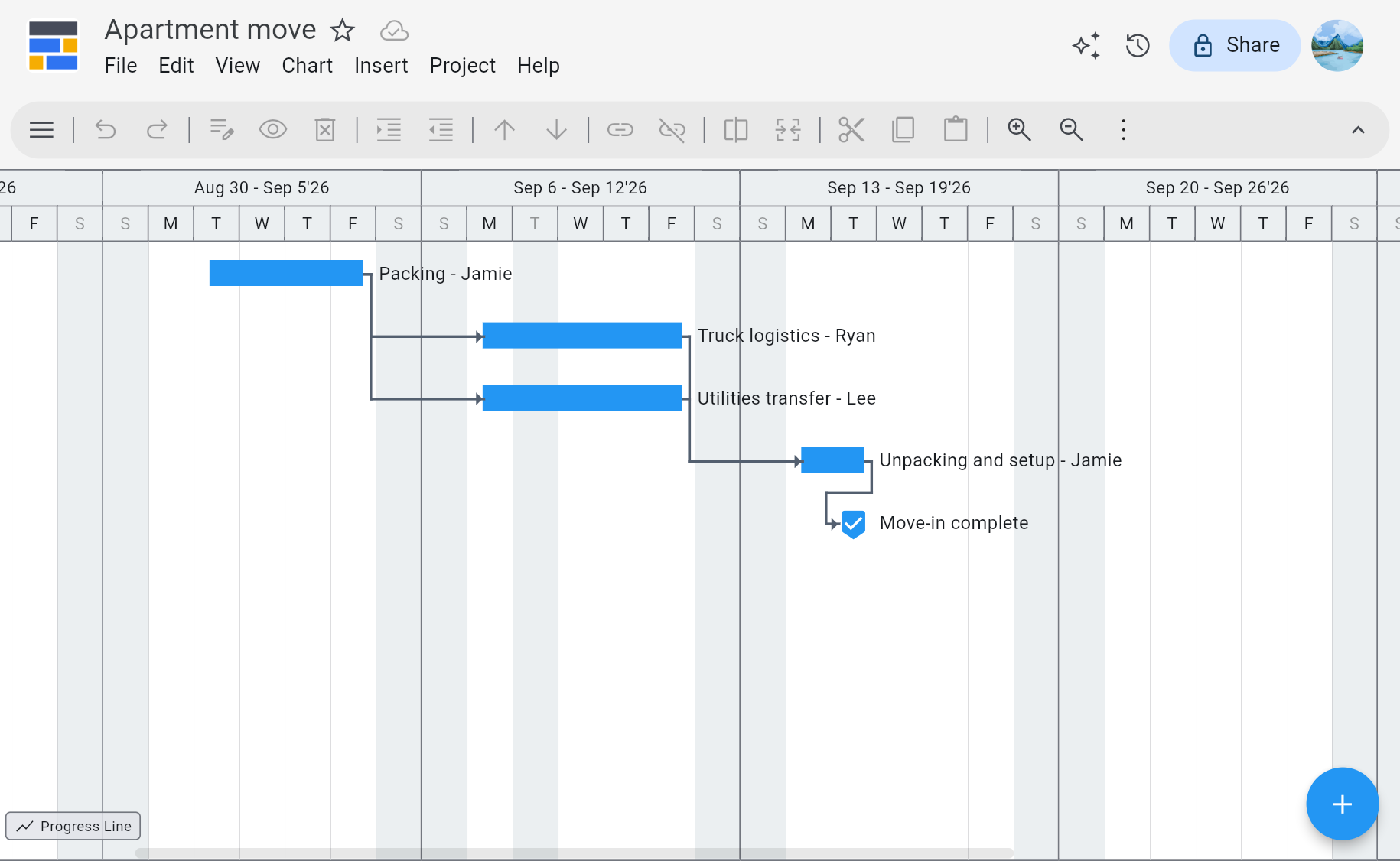
“Apartment move starting September 1. Jamie does 3 days of packing, then Ryan and Lee handle truck logistics and utilities transfer in parallel for 4 days, then Jamie does 2 days of unpacking and setup, then a move-in complete milestone. Jamie is off September 2. Treat September 8 as a national holiday.”
What an AI Gantt Chart Should Actually Do
Prompt → Full Plan, ~30s
One paragraph describing your project produces a complete Gantt chart with phases, tasks, sub-tasks, and realistic durations — not a blank template to fill in.
Dependencies & Critical Path, Automatic
The AI wires finish-to-start dependencies, marks milestones, and Ingantt recomputes the critical path the moment you move any task.
Fully Editable, No Lock-In
The AI output is a real Gantt chart object — drag bars, change durations, reassign resources, or re-prompt a single section. Nothing is flattened to an image.
Round-Trip with Microsoft Project
Import existing .MPP files, save AI-generated plans back to MS Project's .XML, and hand the file to any teammate who still runs MS Project.
See Ingantt in Action
AI Gantt Chart — Questions People Actually Ask
Yes. Ingantt's AI takes a plain-English project description and returns a complete, editable Gantt chart in roughly 30 seconds — including phases, tasks, sub-tasks, realistic durations, finish-to-start dependencies, and milestones. It's not a static template with your keywords swapped in; it's a live Gantt object you can drag, split, reassign, and save as a .MPP file. The AI handles the structural work — breakdown and sequencing — so you spend your time on the decisions only you can make.
Ingantt passes your project description to a language model trained on project-management patterns. The model decomposes the goal into phases, then tasks and sub-tasks, chooses durations based on common scope benchmarks, and connects dependencies so later work waits on earlier work. Ingantt renders the result as a real Gantt chart, runs the critical-path calculation, and shows it in the editor. From prompt to an editable plan is typically about 30 seconds.
ChatGPT can describe a project plan as text or a markdown table, but it can't produce an interactive, editable Gantt chart with real task bars, finish-to-start dependencies, a live critical path, or resource assignments. It also can't save the result as a .MPP file that opens in Microsoft Project. Ingantt is built for exactly that gap — it uses the same kind of language model for the plan, then renders the output as a real Gantt chart you can edit and export.
A template gives you a generic skeleton and leaves every real decision — which tasks, how long, what depends on what — for you to make by hand. An AI Gantt chart is tailored to your specific project in one step, with sequencing and durations already filled in. In practice the AI gets you past the blank-page problem in about 30 seconds; the template just moves it. Both outputs are editable in Ingantt, but the AI starts you much closer to a real plan.
Yes — every AI-generated plan is a fully editable Gantt chart, not a screenshot or a one-shot draft. Drag task bars to change dates, split tasks, adjust durations, add or remove dependencies, assign resources, or change the work breakdown. You can also re-prompt the AI on a specific phase to regenerate just that section. The critical path recomputes automatically after every change, so you always see the up-to-date project end date.
Yes. The AI draws finish-to-start dependencies between the tasks it generates, so Phase 2 starts when Phase 1 finishes, QA waits on development, and so on. Ingantt then runs the critical-path calculation on the generated plan — the longest chain of dependent tasks is highlighted, and the total project duration reflects it. Move any task and the critical path recomputes. You get the same CPM view a PM would build by hand in MS Project, without the manual wiring.
Ingantt saves projects in Microsoft Project's native .XML format, and exports to PDF and PNG for stakeholders. That means an AI-generated Gantt chart can be opened in Microsoft Project by a teammate who has it installed, handed off to a vendor, or shared as a read-only PDF. Importing existing .MPP files works the same way — Ingantt is a round-trip MS Project tool, not a one-way cloud silo.
Yes. The 7-day free trial includes unlimited AI project generation, full editing, MS Project .MPP import, XML/PDF/PNG export, and Google Drive integration. No credit card is required to start, and nothing is charged when the trial ends unless you subscribe. Paid plans start at $5.99 per user per month, and your project files stay in your Google Drive either way, so there's no lock-in if you decide to stop.